
Safari’s Compact Tab Bar Returns in macOS 26.4 and iPadOS 26.4
SDMacTech note: Many iPhone and iPad features are powerful but easy to miss. If these steps do not look the same on your device, it may be due to your iOS/iPadOS version or device model.
At SDMacTech, I help San Diego Mac, iPhone, and iPad users make technology less frustrating and more reliable.
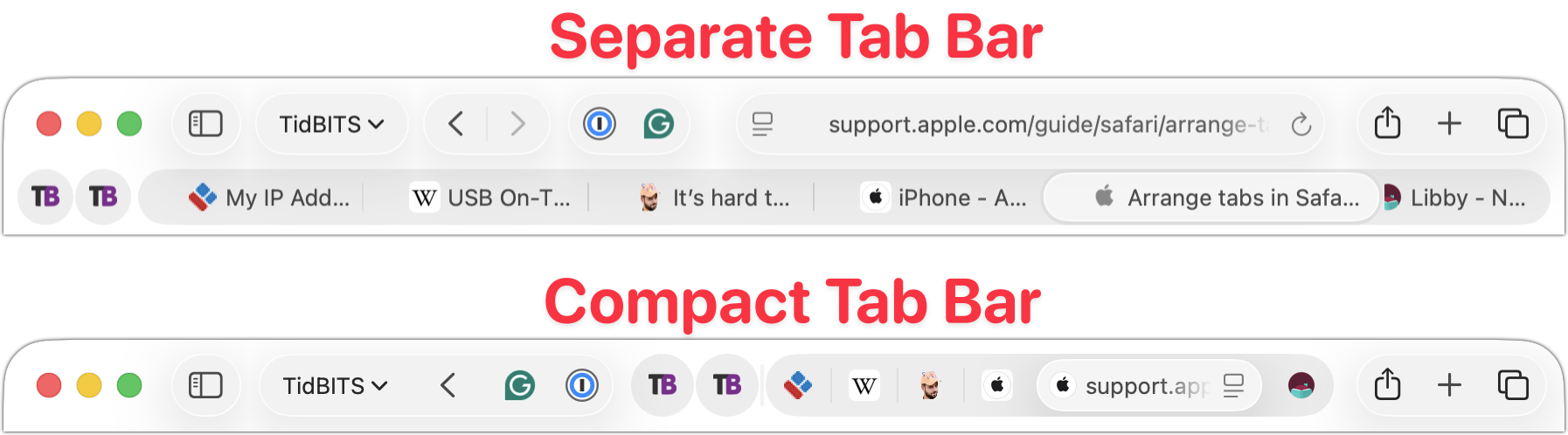
Safari’s compact tab bar option, which saves vertical space by placing the address bar in the current tab, went missing in the initial releases of macOS 26 Tahoe and iPadOS 26. Only Apple knows why this helpful option disappeared (Liquid Glass?), but as of macOS 26.4 and iPadOS 26.4, it’s back! On the Mac, select it in Safari > Settings > Tabs; on the iPad, look in Settings > Apps > Safari.
(Featured image based on an original by iStock.com/czekma13)
You must be logged in to post a comment.