Wifi that works in every room. Installed by a pro.
I design and install Eero mesh wifi for San Diego homes and businesses: surveyed on-site, wired where it counts, tuned for your space, and supported long after install day.
- Certified Eero Pro installer
- 30+ years of Apple experience
- I come to you, county-wide
Sound familiar?
Most “bad wifi” is really one router doing an impossible job
The back-bedroom dead zone
One router can’t push a clean signal through stucco, tile, and three walls. The far side of the house limps along at a crawl.
Calls that freeze mid-sentence
The video call stutters the moment someone else starts streaming. That’s congestion and interference, not bad luck.
The disappearing printer
Devices that vanish from the network point to roaming and band problems. A mesh set up correctly ends the mystery for good.
Why Eero
One network. Zero dead zones. No babysitting.
Eero replaces your single router with a mesh of small, powerful access points that blanket the whole space. Here is what that gets you when it’s installed right.
Coverage everywhere
Garage, backyard, upstairs office, the register at the front of the shop. TrueMesh routes traffic around obstacles and interference.
Seamless roaming
One network name for the whole property. Walk from the kitchen to the office mid-call and your devices never skip a beat.
It heals itself
Updates arrive overnight with the latest speed, stability, and security improvements. The network you had last year keeps getting better.
Security built in
Network-level protection and automatic security patches, so the network your business or family runs on stays safe.
Simple control
One app shows every device. Pause the kids’ internet at dinner, share guest access with a tap, see exactly what’s connected.
Ready for fast fiber
Current Eero models keep up with the fastest plans Cox, Spectrum, and AT&T Fiber sell in San Diego, wired and wireless.
The certified installer difference
Eero is easy. Great wifi still takes planning.
Unit placement, wired backhaul, modem and ISP configuration, smart-home quirks, and neighborhood interference decide whether you get “fine” wifi or great wifi. That planning is exactly what I bring, plus professional monitoring after I leave.
The current lineup
Which Eero? That’s my job to figure out.
The Wi-Fi 7 family covers everything from apartments to estates with big backyards. The survey decides which models, and how many, your space actually needs.

Eero 7
WI-FI 7- Best for plansUp to 2.5 Gbps
- Wireless speedUp to 1.8 Gbps
- PortsTwo 2.5 GbE
- Coverage per unit2,000 sq ft
- Devices120+

Eero Pro 7
WI-FI 7 · TRI-BAND- Best for plansUp to 5 Gbps
- Wireless speedUp to 3.9 Gbps
- PortsTwo 5 GbE
- Coverage per unit2,000 sq ft
- Devices200+
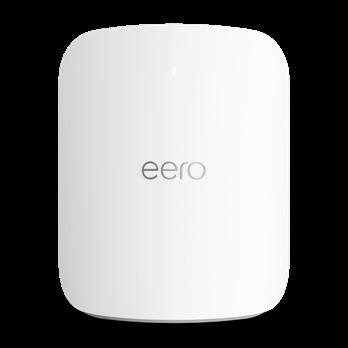
Eero Max 7
WI-FI 7 · TRI-BAND- Best for plansUp to 10 Gbps
- Wired / wireless9.4 / 4.3 Gbps
- PortsTwo 10 GbE + two 2.5
- Coverage per unit2,500 sq ft
- Devices200+
Eero Outdoor 7
WI-FI 7 · OUTDOOR- Built forPatios & yards
- CoverageUp to 15,000 sq ft*
- PowerPoE+
- PortOne 2.5 GbE PoE+
- Devices100+
Specs from Eero’s 2025 device comparison chart. *Unobstructed outdoor coverage. Earlier Wi-Fi 6 and 6E models remain available where they’re the smarter fit for the budget.
Flagship spotlight
Eero Max 7: the fastest Eero ever designed.
Wired speeds up to 9.4 Gbps and wireless up to 4.3 Gbps, built for 8K streaming, serious gaming, and studios that move big files all day. Two 10 Gigabit Ethernet ports mean the wired backhaul I install actually keeps up.
How it works
From dead zones to done in four steps
Survey
I walk your space and measure how signal actually behaves through your walls, floors, and interference, and find where wifi goes to die.
Design
The right Eero models and unit count for your square footage, a placement plan, and wired backhaul where it counts. You get a straight answer on cost before any work starts.
Install
Modem and ISP handoff, clean placement and wiring, guest and staff networks, parental controls, and every last device migrated: Macs, iPhones, printers, HomeKit, TVs.
Handoff & support
A walkthrough of the Eero app so you’re in control, and optional ongoing monitoring through Eero Insight so future problems get fixed remotely.
For homes
Whole-home coverage for streaming, remote work, and smart homes, with every Apple TV, HomeKit gadget, printer, and iPad working like it should. A natural add-on to my regular Mac support visits.
- Backyard, garage, and casita coverage
- Parental controls set up with you
- Smart-home devices migrated and tested
For businesses
When your point of sale, phones, and cloud apps ride on wifi, reliability isn’t optional. Eero for Business installs built for uptime, with remote monitoring so problems get fixed fast.
- Separate staff and guest networks
- Wired backhaul where it counts
- Monitored through Eero Insight
Eero for Business
Business-grade wifi without enterprise headaches
Eero for Business adds the tools a storefront or office actually needs: ideal for up to 100 connected devices and 7,500 sq ft of space, managed through one clean dashboard.
Multiple networks (SSIDs)
Separate networks for staff, point of sale, and guests, so devices are segmented and business-critical traffic stays protected.
Branded guest portal
Captive Portal greets visitors with your brand and can collect acceptance of your terms and privacy policy, compliance built in.
Eero Secure protection
Network-level threat protection, content filters, and ad blocking help keep the whole business safer online.
One pane of glass
Eero Insight gives me advanced analytics, device health, and troubleshooting for your network in a single dashboard.
Guest bandwidth limits
Cap what guest networks can use, so visitors browsing never slows down the register or your cloud apps.
Always on
The local network stays up even if the cloud goes down, keeping your point of sale and printers running.
What you get
Every Eero install includes
- On-site wifi survey and coverage plan
- The right Eero models and unit count for your space
- Modem and ISP handoff, placement, and wiring
- Every device migrated to the new network
- Guest network and parental controls configured
- Eero app walkthrough so you’re in control
- A network tested from every corner before I leave
- Optional ongoing monitoring through Eero Insight
Good questions
Eero installation FAQ
Do I need to buy the Eero units before you come out?
No. The survey and design come first, so you buy exactly the models and unit count your space needs, nothing more. I’ll tell you where each one goes and why.
Will it work with Cox, Spectrum, or AT&T Fiber?
Yes. Eero works with every provider serving San Diego. I handle the modem or fiber gateway handoff as part of the install, including bridging your old router so nothing fights the new network.
What does an install cost?
Every space is different, so I don’t quote blind. After the on-site survey you get a clear, itemized quote covering hardware and installation before any work starts.
What happens to my old router and network name?
I can keep your existing network name and password, so most devices reconnect on their own. Your old router is either retired or bridged properly so it can’t cause conflicts.
Which Eero model do I need?
That depends on your internet plan, square footage, construction, and how many devices you run. As a rule of thumb: Eero 7 for gigabit-class plans, Pro 7 for multi-gig, Max 7 when you want the absolute fastest, and Outdoor 7 for patios and yards. The survey gives you an exact answer.
Can you fix problems later without a visit?
Usually, yes. As a certified Eero Pro installer I can monitor your network through Eero Insight with your permission, which means most issues are diagnosed and fixed remotely.
Ready for wifi that just works?
I come to you, anywhere in San Diego County. Start with a wifi and network assessment and get a straight answer about what your space actually needs.