
Who Should You Share Your Apple Device Passcodes With? (And How to Make Access Easier)
Sharing your iPhone, iPad, or Mac passcode is a big deal, so only do it with people you trust like you’d trust with your bank account or medical info. Think close family members or a spouse, folks you’d hand your wallet to without flinching.
If those trusted people also use your device regularly (like checking something on your iPad or logging into your Mac), you can make their access faster and more secure by setting them up with Touch ID or Face ID.
-
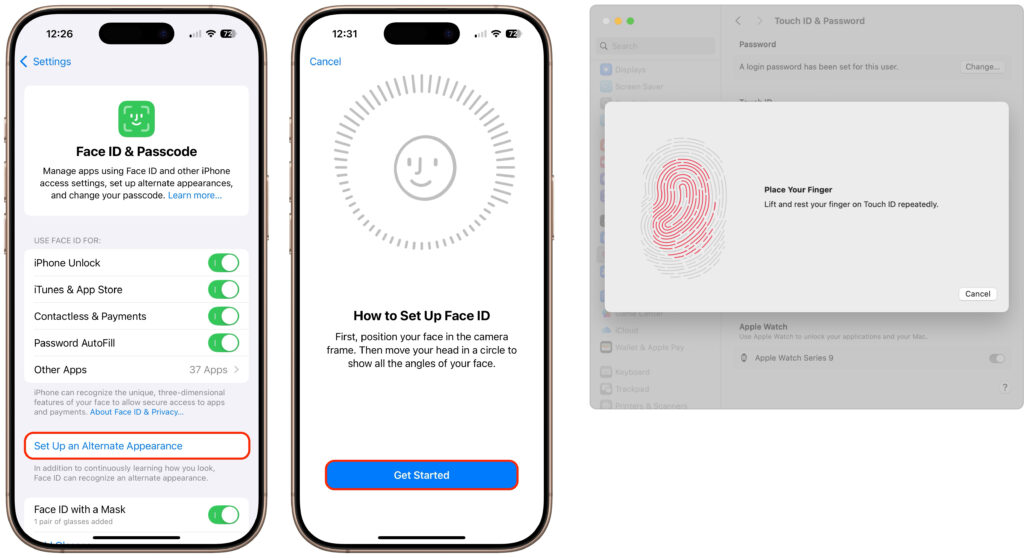
Touch ID (used on some iPhones, iPads, and most Macs) lets you store up to five fingerprints.
-
Face ID (available on newer iPhones and iPads) allows you to add a second face—perfect for a spouse or partner.
Setting this up is easy:
-
On iPhone or iPad, go to Settings > Face ID / Touch ID & Passcode
-
On Mac, open System Settings > Touch ID & Password
It’s a quick setup that keeps your device secure while avoiding the awkward “Can you tell me your passcode again?” every time someone needs to use it.
Screenshot
(Featured image by iStock.com/Giulio Fornasar)
You must be logged in to post a comment.